
How to Install Hot IPTV Player on Firestick for CatchON TV (Ultimate Setup Guide)
Learn how to install Hot IPTV Player on Firestick and connect CatchON TV quickly, so you can start streaming live TV, movies, and series with a fast and reliable setup.
Setting up Hot IPTV Player on Firestick is easier than making your morning coffee… and way more rewarding ☕📺
If you want a fast, simple, no-nonsense IPTV app to use with CatchON TV, Hot IPTV Player is one of the easiest options—especially for beginners.
In this step-by-step guide, you’ll learn exactly how to install it, set it up, and start streaming in minutes.
🧰 What You Need Before You Start
Before we begin, make sure you have:
Amazon Firestick (any version)
Active CatchON TV subscription
Stable internet connection (WiFi or Ethernet)
Firestick remote (yes… you’ll need it 😄)
👉 If you haven’t already, check the full setup hub here:
⚙️ Step 1 – Enable Developer Options on Firestick
Since Hot IPTV Player is not available in the Amazon App Store, we need to allow third-party apps.
Follow these steps:
Go to Settings
Select My Fire TV
Click Developer Options
Turn ON:
✅ Apps from Unknown Sources
✅ ADB Debugging
💡 If you don’t see Developer Options:
Go to About → Fire TV Stick
Click it 7 times to unlock it.
📥 Step 2 – Install Downloader App
The Downloader app lets you install apps that aren’t available in the Amazon Store.
Steps:
Go to Search (🔍 icon)
Type Downloader
Install the app
Open it once installed
📲 Step 3 – Download Hot IPTV Player
Now let’s install the app.
Inside Downloader:
Enter this URL: https://apk.hotplayer.app/
OR use code:
395800
Click Go
Wait for download
Click Install
After installation → Click Done
👉 You can delete the APK file to save space (recommended)
🚀 Step 4 – Open Hot IPTV Player
Now:
Go to Your Apps & Channels
Open Hot IPTV Player
When the app launches, you’ll see a MAC Address on the screen.
⚠️ This is very important — you’ll need it to connect CatchON TV.
🔑 Step 5 – Connect CatchON TV to Hot Player
Hot IPTV Player does NOT include channels.
You need to connect it to your CatchON TV subscription.
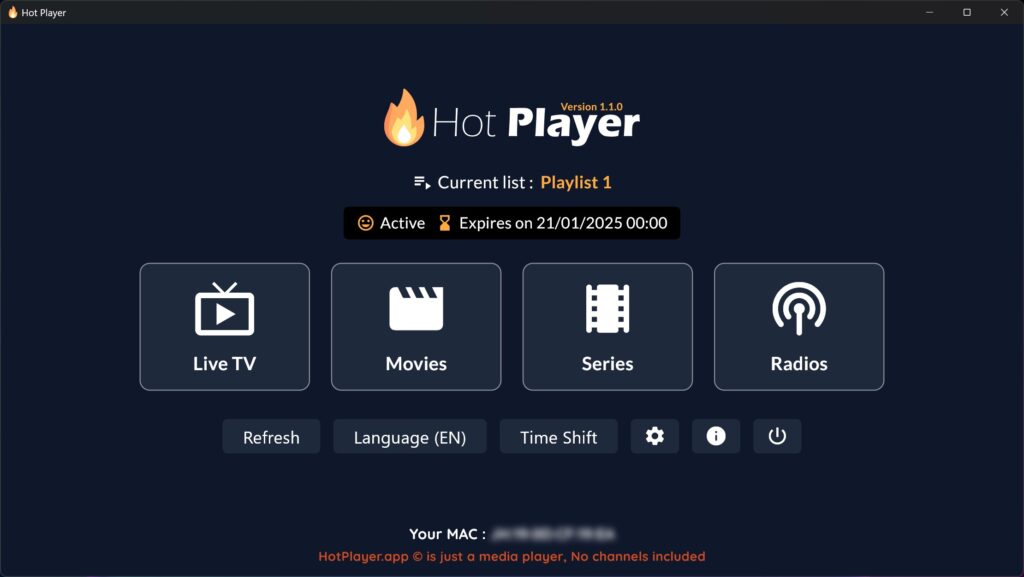
✅ Option 1 (Recommended) – MAC Address Activation
Copy your MAC address from the app
Send it to CatchON TV support
Your account will be activated
Once activated → channels will appear automatically 🎉
⚙️ Option 2 – M3U Playlist (If supported)
If your plan includes M3U:
Select Add Playlist
Enter:
Username
Password
Server URL
OR paste full M3U link
⚡ Optimize Performance on Firestick (Must Do)
Want smoother streaming and less buffering? Do this:
🔄 Restart Firestick regularly
📶 Use 5GHz WiFi instead of 2.4GHz
🧹 Clear cache from settings
❌ Close background apps
💡 IPTV performance = 50% app + 50% internet quality
📌 Move Hot IPTV Player to Home Screen
Save time every day:
Hold the Home button
Select Apps
Highlight Hot IPTV Player
Press Menu (☰)
Click Move → Move to front
🛠️ Troubleshooting (Fix Common Issues)
❌ App not installing
→ Make sure Unknown Sources is enabled
📡 Buffering or freezing
→ Check internet speed
→ Restart router
→ Try different connection (WiFi vs Ethernet)
🔑 Channels not loading
→ MAC address not activated
→ Contact CatchON TV support
⚠️ App crashing
→ Clear cache
→ Reinstall app
⭐ Why Use Hot IPTV Player for CatchON TV?
Here’s why many users love it:
⚡ Lightweight and fast
🧠 Very easy to use (no confusion)
🔑 Simple MAC activation
📺 Works smoothly on Firestick
👉 Perfect for beginners who just want to “install and watch”
⭐ Why Use Hot IPTV Player for CatchON TV?
Here’s why many users love it:
⚡ Lightweight and fast
🧠 Very easy to use (no confusion)
🔑 Simple MAC activation
📺 Works smoothly on Firestick
👉 Perfect for beginners who just want to “install and watch”
CatchON TV Installation on Hot IPTV Player FAQ
Check the frequently-asked questions about how to install CatchON TV service on HOT IPTV Player.
Is Hot IPTV Player free?
Yes, but requires activation with an IPTV provider like CatchON TV.
Does Hot IPTV include channels?
No — it’s just a player. You need to get channels and content from CatchON TV.
Can I use CatchON TV with Hot Player?
Yes, via MAC activation or playlist.
Is it safe to install on Firestick?
Yes, as long as you download from trusted sources.
🚀 Ready to Start Streaming?
You’re just one step away from unlocking thousands of channels.
👉 Activate your subscription here: